CSS
html, body{
width: 100%;
overflow-x: hidden;
}
/* Chrome, Edge e Safari */
body::-webkit-scrollbar {
  width: 10px; /*largura da barra*/
}

body::-webkit-scrollbar-track {
  background: #000000; /*cor do fundo*/
}

body::-webkit-scrollbar-thumb {
  background: #ffffff; /*cor do controle do scroll*/
  border-radius: 10px; /*arredondamento*/
  border: 2px solid #000000; /*borda*/
}

/* Firefox */
@-moz-document url-prefix() {
  * {
    scrollbar-width: 10px;
    scrollbar-color:
                    #C8F0A5 /*cor do controle do scroll*/
                    #000000; /*cor do fundo*/
    -moz-appearance: scrollbar;
  }
}
@media (max-width: 767px){
    selector .elementor-image-box-wrapper{
        display: flex;
        gap: 10px;
    }
}
selector{
    text-wrap: balance;
}
em, i {
    display: inline-block;
    font-style: normal!important;
    transform: skew(-15deg);
}
Pré carregar
<link href="#" rel="preload" as="image">
<link href="#" rel="preload" as="image" media="(max-width: 1023px)">
<link rel="preload" href="#" as="font" type="font/woff2" crossorigin>
<link rel="preload" href="#" as="style" type="text/css" crossorigin>
<link href="#" rel="preload" as="video" media="(max-width: 767px)">
<link href="#" rel="preload" as="video">
<link href="#" rel="preload" as="image" media="(min-width: 1024px)">
<link href="#" rel="preload" as="image" media="(max-width: 767px)">
<link rel="preload" href="#" as="script" type="text/javascript" crossorigin>
<link rel="preconnect" href="#" crossorigin>
Otimização de Carregamento e Precarregamento
Insira o código base64 gerado no Custom Code do site e remove o favicon personalizado do tema;
Converter pra base64
Insere no custom code
Remove o personalizado do tema
Cache-Control: public, max-age=86400, stale-while-revalidate=604800, stale-if-error=604800
WEBP EXPRESS - Código do Cache-Control Header
public, max-age86400, stale-while-revalidate=604800, stale-if-error=604800
Conversion
- WebP encoding: Lossy
- Quality for lossy: Fixed quality, 100
- WebP encoding: Lossless
- Quality for lossless: 100% lossless
- Conversion method: No metadata in webp
- Gd extension (configure, test, deactivate)
- Imagick (PHP extension) (configure, test, deactivate)
Convert on upload
- Enable logging (opcional)
- Bulk convert (opcional)
Alter HTML?
- Replace <img> tags with <picture> tags
- Replace image URLs
- Only do the replacements in webp enabled browsers
- Reference webps that haven’t been converted yet
<svg xmlns="http://www.w3.org/2000/svg" width="{width}" height="{height}" viewBox="0 0 {width} {height}"><rect width="100%" height="100%" style="fill:{color};fill-opacity: 0.1;"/></svg>
Configurações de Scroll
html, body{
    width: 100%;
    overflow-x: hidden;
}
[data-elementor-type="wp-page"]{ /* Elementor Canva */
    overflow: hidden;
}

[data-elementor-type="wp-post"]{ /* Elementor Largura Total */
    overflow: hidden;
}
Links e SEO
<a href="#LINK AQUI" rel="nofollow" target="_blank" rel="noreferrer noopener">TEXTO AQUI</a>
<a href="#LINK AQUI">Política de Privacidade</a>
Scripts de Delay
<style>.esconder { display: none }</style>

<script nowprocket type="text/javascript">
document.addEventListener("DOMContentLoaded", function() {
    /* ALTERE O VALOR 10 PARA OS SEGUNDOS EM QUE AS SEÇÕES VÃO APARECER */
    var SECONDS_TO_DISPLAY = 220;
    var CLASS_TO_DISPLAY = ".esconder";

    /* DAQUI PARA BAIXO NAO PRECISA ALTERAR */
    var attempts = 0;
    var elsHiddenList = [];
    var elsDisplayed = false;
    var elsHidden = document.querySelectorAll(CLASS_TO_DISPLAY);
    var alreadyDisplayedKey = `alreadyElsDisplayed${SECONDS_TO_DISPLAY}`
    var alreadyElsDisplayed = localStorage.getItem(alreadyDisplayedKey);

    setTimeout(function () { elsHiddenList = Array.prototype.slice.call(elsHidden); }, 0);

    var showHiddenElements = function () {
        elsDisplayed = true;
        elsHiddenList.forEach((e) => e.style.display = "block");
        localStorage.setItem(alreadyDisplayedKey, true)
    }

    var startWatchVideoProgress = function () {
        if (typeof smartplayer === 'undefined' || !(smartplayer.instances && smartplayer.instances.length)) {
            if (attempts >= 10) return;
            attempts += 1;
            return setTimeout(function () { startWatchVideoProgress() }, 1000);
        }

        smartplayer.instances[0].on('timeupdate', () => {
            if (elsDisplayed || smartplayer.instances[0].smartAutoPlay) return;
            if (smartplayer.instances[0].video.currentTime < SECONDS_TO_DISPLAY) return;
            showHiddenElements();
        })
    }

    if (alreadyElsDisplayed === 'true') {
        setTimeout(function () { showHiddenElements(); }, 100);
    } else {
        startWatchVideoProgress()
    }
});
</script>
<style>
    .esconder{
        top: -100% !important;
        opacity: 0;
        position: absolute;
        height: 0;
        overflow: hidden;
        pointer-events: none;
    }
</style>

<script>
    var elementosEscondidos = document.querySelectorAll('.esconder');

    setTimeout(function() {
        elementosEscondidos.forEach(function(elemento) {
            elemento.classList.remove("esconder");
        });
    }, 1000 * 5); /* altere o número de segundos ou minutos ex: 1000 * 5 = 5 segundos ou 1000 * 5 * 60 = 5 minutos */
</script>
Exclusões de Conexão e JS
utm_campaign
utm_source
utm_term
utm_medium
utm_content
gclid
fbclid
first_utm_campaign
first_utm_source
first_utm_term
first_utm_medium
first_utm_content
handl_original_ref
handl_landing_page
handl_ip
handl_ref
handl_url
organic_source
gaclientid
src
sck
ref
WPRocket: Regras Avançadas > String(s) de Consulta em Cache
LiteSpeed: Cache > Não armazenar strings de consulta em cache
maps.googleapis.com
map.js
WPRocket: Otimizar Arquivos > Arquivos JavaScript Excluídos
LiteSpeed: Otimização de páginas > Exclusões de JS
Puxar UTMs e Parâmetros em URLs
<script>
    const queryString = window.location.search;
    const urlParams = new URLSearchParams(queryString);
    param = urlParams.get('ls');
    document.addEventListener('DOMContentLoaded', ()=>{
        btnFund1 = document.querySelector("#btn-fundador1")
        btnFund2 = document.querySelector("#btn-fundador2")
        btnFund3 = document.querySelector("#btn-fundador3")

        if(param){
            btnFund1.href += param;
            btnFund2.href += param;
            btnFund3.href += param;
        }
    })
</script>
Checkout Personalizado
Checkout Hotmart - Tutorial
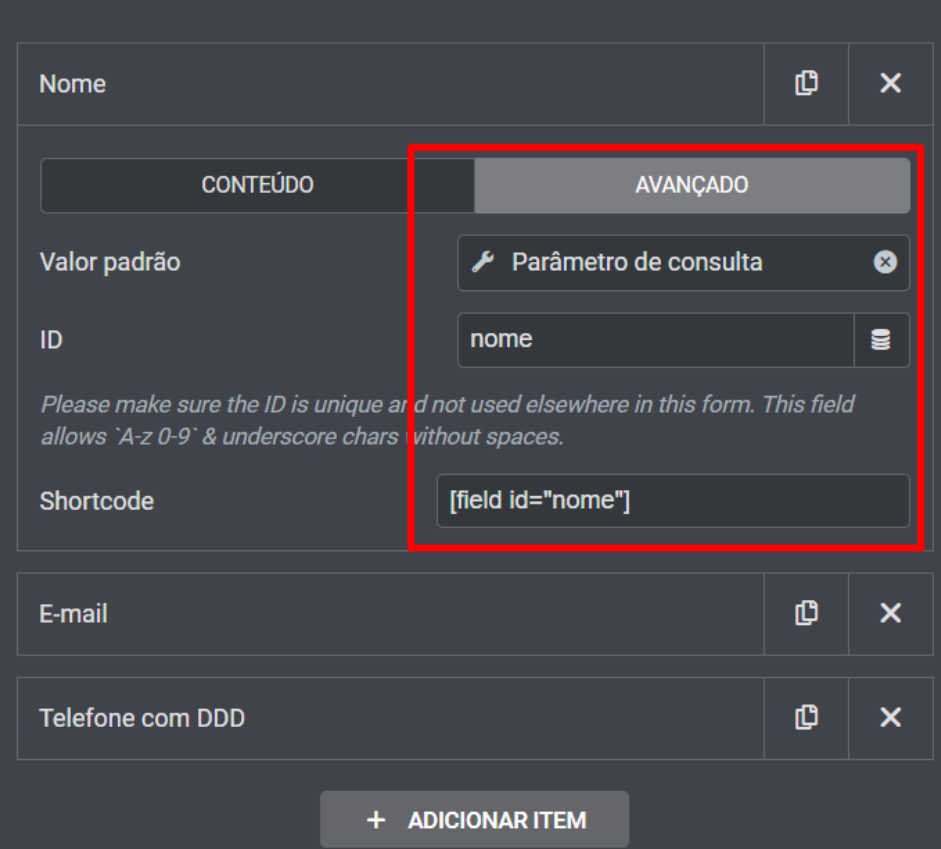
- Configurar os IDs no formulário com parâmetro de consulta puxando os ID.
- Redirecionar o form para o link com os parâmetros.
Nome: &name=
E-mail: &email=
Código DDD + Telefone: &phoneac=dddtelefonedocomprador &phonenumber=telefonedocomprador
Exemplo:
https://pay.hotmart.com/B42241190A?off=paqarjrb&checkoutMode=10
O link final fica assim:
https://pay.hotmart.com/B42241190A?off=paqarjrb&checkoutMode=10&name=[field id="nome"]&email=[field id="email"]&phoneac=[field id="whats"]
Parâmetros adicionais:
- Aparecer preço parcelado: &split=12
- Esconder boleto: &hideBillet=1
- Esconder PayPal: &hidePayPal=1
- Esconder Transferência: &hideTransf=1
- Esconder 2 cartões: &hideMultipleCards=1
- Esconder PIX: &hidePix=1
https://pagamento.ieac.net.br/checkout/mentoria-profissionais?name=[field id="name"]&email=[field id="email"]&phone=[field id="phone"]
Acessibilidade e Usabilidade
<script nowprocket>
/*widget sanfona*/
const elementosAccordion = document.querySelectorAll('.elementor-accordion-title');
elementosAccordion.forEach(elementoAccordion => {
    const novoElemento = document.createElement('span');
    novoElemento.innerHTML = elementoAccordion.innerHTML;
    novoElemento.classList.add("elementor-accordion-title");
    elementoAccordion.parentNode.replaceChild(novoElemento, elementoAccordion);
});

/*widget sanfona e acordeao*/
document.addEventListener('DOMContentLoaded', function () {
setTimeout(() =>{
    const tabTitles = document.querySelectorAll('.elementor-tab-title');
    tabTitles.forEach(tabTitle => {
        tabTitle.setAttribute("tabindex", "-1");
    });
}, 500);
});

/*widget de abas*/
const tabsWrapper = document.querySelectorAll(".elementor-tabs-content-wrapper");
    const tabContents = document.querySelectorAll('.elementor-tab-content');
    tabContents.forEach(tabContent => {
        tabContent.setAttribute("tabindex", "-1");
    });
tabsWrapper.forEach(tabWrapper => {
    tabWrapper.setAttribute('aria-hidden', 'true');
});

/*widget acordeão*/
const elementosToggle = document.querySelectorAll('.elementor-toggle-title');
elementosToggle.forEach(elementoToggle => {
    const novoToggle = document.createElement('span');
    novoToggle.innerHTML = elementoToggle.innerHTML;
    novoToggle.classList.add("elementor-toggle-title");
    elementoToggle.parentNode.replaceChild(novoToggle, elementoToggle);
});

const accordionItems = document.querySelectorAll('.elementor-toggle-item, .elementor-accordion-item');
accordionItems.forEach(item => {
    item.setAttribute("role", "tab");
    item.setAttribute('aria-hidden', 'true');
});

/*botões SVG*/
const botoes = document.querySelectorAll(".botao a");
botoes.forEach(botao => {
    botao.setAttribute('aria-label', 'QUERO ME INSCREVER AGORA');
});
</script>
<!-- CAMPO-->
<input class="cmz" type="text" id="field[19]" name="field[19]" value="" placeholder=""/>
<!-- FIM DO CAMPO-->

<style>
    .cmz{
    display: none;
}
</style>

<script>
document.addEventListener('DOMContentLoaded', function() {
    const botao = document.querySelector('._submit');
    const cmz = document.querySelector('.cmz');

    botao.addEventListener('click', function(event) {
        if (cmz.value.trim() !== '') {
            event.preventDefault();
        }
    });
});
</script>
Declaração de Header e Footer
<script>
window.addEventListener( 'elementor/frontend/init', function() {
if ( typeof elementorFrontend === 'undefined' ) {
return;
}

elementorFrontend.on( 'components:init', function() {
elementorFrontend.utils.anchors.setSettings('selectors',{});

} );
} );
</script>

<style>
html, body {
scroll-padding-top: 100px; /* adjust as needed */
}

@media (prefers-reduced-motion: no-preference) {
html, body {
scroll-behavior: smooth;
}
}
</style>
Tutorial: Declarar Header, Main, Article e Footer
Assista ao vídeo tutorial para entender como declarar corretamente as tags HTML5:
Efeitos Visuais
/*efeito pulse coração do CTA*/
.pulse {
    animation: pulse 0.7s infinite;
    margin: 0 auto;
    display: table;
    margin-top: 0px;
    animation-direction: alternate;
    -webkit-animation-name: pulse;
    animation-name: pulse;
}
@-webkit-keyframes pulse {
    0% {
    -webkit-transform: scale(1);
}
100% {
    -webkit-transform: scale(1.1);
}
} @keyframes pulse {
    0% {
    transform: scale(1);
}
100% {
    transform: scale(1.1);
}}

/*efeito pulse radar do CTA*/
.cta-pulse .elementor-button{
    animation: pisca 1.2s infinite;
    box-shadow: 0px 0px 20px -5px var(--e-global-color-accent);
}
@keyframes pisca {
    70% {
        box-shadow: 0 0 0 20px transparent;
    }
    100% {
        box-shadow: 0 0 0 0 transparente;
    }
}
.cta-pulse .elementor-button svg{
    height: 0.9em;
    fill: #028c49;
}
<div style="display: flex; justify-content: center; align-items: center; height: 100%;">
  <a class="box__link button-animation" href="#">
    Clique Aqui
    <span></span>
    <span></span>
    <span></span>
    <span></span>
  </a>
</div>

<style>
    .button-animation {
        position: relative;
        display: inline-block;
        padding: 20px 30px;
        color: #03e9f4;
        text-transform: uppercase;
        overflow: hidden;
        letter-spacing: 4px;
        transition: 0.5s;
    }

    .button-animation span {
        position: absolute;
        display: block;
    }

    .button-animation span:nth-child(1) {
        top: 0;
        left: -100%;
        width: 100%;
        height: 2px;
        background: linear-gradient(90deg, transparent, #03e9f4);
        animation: btn-anim1 1s linear infinite;
    }

    @keyframes btn-anim1 {
        0% {
            left: -100%;
        }
        50%,
        100% {
            left: 100%;
        }
    }

    .button-animation span:nth-child(2) {
        top: -100%;
        right: 0;
        width: 2px;
        height: 100%;
        background: linear-gradient(180deg, transparent, #03e9f4);
        animation: btn-anim2 1s linear infinite;
        animation-delay: 0.25s;
    }

    @keyframes btn-anim2 {
        0% {
            top: -100%;
        }
        50%,
        100% {
            top: 100%;
        }
    }

    .button-animation span:nth-child(3) {
        bottom: 0;
        right: -100%;
        width: 100%;
        height: 2px;
        background: linear-gradient(270deg, transparent, #03e9f4);
        animation: btn-anim3 1s linear infinite;
        animation-delay: 0.5s;
    }

    @keyframes btn-anim3 {
        0% {
            right: -100%;
        }
        50%,
        100% {
            right: 100%;
        }
    }

    .button-animation span:nth-child(4) {
        bottom: -100%;
        left: 0;
        width: 2px;
        height: 100%;
        background: linear-gradient(360deg, transparent, #03e9f4);
        animation: btn-anim4 1s linear infinite;
        animation-delay: 0.75s;
    }

    @keyframes btn-anim4 {
        0% {
            bottom: -100%;
        }
        50%,
        100% {
            bottom: 100%;
        }
    }

    .button-animation:hover {
        background-color: #03e9f4;
        color: #fff;
        border-radius: 5px;
        box-shadow: 0 0 5px #03e9f4, 0 0 25px #03e9f4, 0 0 50px #03e9f4, 0 0 100px #03e9f4;
    }
</style>

Segurança
(ip.geoip.country in {"AF" "AX" "AL" "DZ" "AS" "AD" "AO" "AI" "AQ" "AG" "AM" "AW" "AU" "AT" "AZ" "BS" "BH" "BD" "BB" "BY" "BE" "BZ" "BJ" "BM" "BT" "BQ" "BA" "BW" "BV" "IO" "VG" "BN" "BG" "BF" "BI" "KH" "CM" "CV" "KY" "CF" "TD" "CN" "CX" "CC" "KM" "CK" "CR" "HR" "CW" "CY" "CZ" "CD" "DK" "DJ" "DM" "DO" "TL" "EG" "SV" "GQ" "ER" "EE" "ET" "FK" "FO" "FJ" "FI" "GF" "PF" "TF" "GA" "GM" "GE" "GH" "GI" "GR" "GL" "GD" "GP" "GU" "GT" "GG" "GN" "GW" "GY" "HT" "HM" "HN" "HK" "HU" "IS" "IN" "ID" "IR" "IQ" "IE" "IM" "IL" "CI" "JM" "JP" "JE" "JO" "KZ" "KE" "KI" "XK" "KW" "KG" "LA" "LV" "LB" "LS" "LR" "LY" "LI" "LT" "LU" "MO" "MK" "MG" "MW" "MY" "MV" "ML" "MT" "MH" "MQ" "MR" "MU" "YT" "FM" "MD" "MC" "MN" "ME" "MS" "MA" "MZ" "MM" "NA" "NR" "NP" "NL" "AN" "NC" "NZ" "NI" "NE" "NG" "NU" "NF" "KP" "MP" "NO" "OM" "PK" "PW" "PS" "PG" "PH" "PN" "PL" "PR" "QA" "CG" "RE" "RO" "RU" "RW" "BL" "SH" "KN" "LC" "MF" "PM" "VC" "WS" "SM" "ST" "SA" "SN" "RS" "SC" "SL" "SG" "SX" "SK" "SI" "SB" "SO" "ZA" "GS" "KR" "SS" "ES" "LK" "SD" "SR" "SJ" "SZ" "SE" "CH" "SY" "TW" "TJ" "TZ" "TH" "TG" "TK" "TO" "TT" "TN" "TR" "TM" "TC" "TV" "VI" "UG" "UA" "AE" "UM" "UZ" "VU" "VA" "VN" "WF" "EH" "YE" "ZM" "ZW" "EC" "CO"})